 SleepBestie
Apple Watch Sleep Stages Explained: Deep vs Core vs REM
Deep, Core, and REM are all part of normal sleep. Learn what the labels mean and how to read your watch data alongside sleep duration, recent trends, and how you feel.
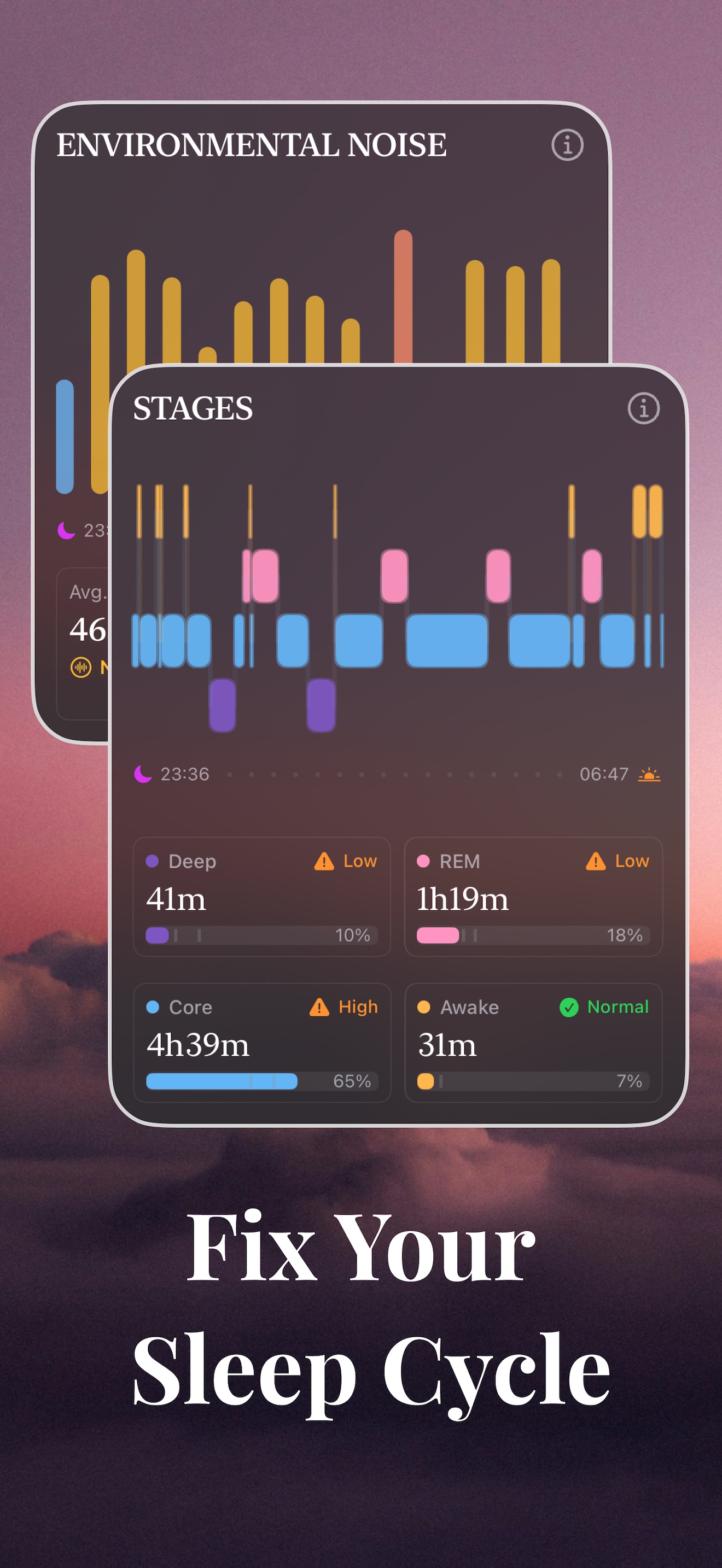
On Apple Watch, Deep is deep non-REM sleep (N3), Core combines lighter non-REM sleep (N1 and N2), and REM is rapid eye movement sleep. All three belong in a night’s sleep. Core is not wasted sleep, and more Deep is not a goal to pursue at the expense of the other stages.
Deep vs Core vs REM: the quick comparison
- Deep (N3): the deepest non-REM stage, usually more prominent earlier in the night.
- Core (N1 + N2): lighter non-REM sleep, including the transition into sleep. It is part of normal sleep, not a failed attempt at Deep.
- REM: a distinct sleep state with rapid eye movements and active brain activity; periods tend to lengthen later in the night.
Awake is shown separately. These are watch estimates, not measurements of brain activity. Read the stage minutes together with total sleep time, rather than ranking the stages from good to bad.
A useful starting point is to compare last night with the previous seven days. Was the difference isolated, or has the pattern continued? Add how rested you feel and any changes to your routine. Your recent average is a reference for comparison, not proof that your sleep is healthy.
What Deep, Core, and REM mean on Apple Watch
Apple groups sleep into Deep, Core, and REM, with Awake shown separately. Its sleep-stage algorithm uses motion signals from the watch, including subtle movements, to estimate these states. The results appear in Apple Health. Time in bed, when shown, is a separate measure and does not necessarily equal time asleep.
A watch does not measure the brain activity used to identify stages in a clinical sleep study. Both real night-to-night variation and estimation errors can affect the chart. Looking at several nights gives you more context, but does not remove those limitations.
Deep: deep non-REM sleep
Deep corresponds to stage N3, also called slow-wave sleep. It is the deepest stage of non-REM sleep and usually occurs more in the earlier part of the night. Its timing and duration vary, so your chart does not need to follow an identical pattern every night.
Deep sleep varies with factors such as age, and a watch reading also depends on how accurately the device identifies the stage. A low estimate on one night does not establish a health problem. If changes persist alongside poor sleep or daytime symptoms, discuss them with a healthcare professional.
What is Core sleep on Apple Watch?
Core is Apple’s label for N1 and N2 combined. N1 is the transition into sleep; N2 is established sleep before deeper N3 sleep. Some trackers group these stages under “light sleep.” Lighter than Deep does not mean you were awake or that the sleep had no value.
Why can Core take up so much of the chart? It combines two stages, and sleep cycles return to lighter sleep during the night. Its percentage also depends on the total being used: the same Core minutes occupy a larger share of a shorter night. The watch may misclassify stages too. A high Core percentage alone cannot tell you which explanation applies, or whether your sleep is poor.
If Core looks unusually high, check total sleep time and the actual minutes first, then compare several nights recorded in a similar way. If you feel persistently unrefreshed or have other symptoms, seek advice even when the chart resembles your usual pattern. Reducing Core is not a treatment goal on its own.
REM: rapid eye movement sleep
REM stands for rapid eye movement sleep. Brain activity increases during this stage, and vivid dreams often occur. REM periods tend to become longer later in the night, so cutting the night short can reduce the opportunity for REM sleep.
The REM total on your watch is still an estimate. Consider it alongside sleep duration and your recent pattern. A single percentage cannot tell you how well your brain has recovered or diagnose a problem with memory or mood.
Awake marks periods when the watch estimates you were awake. Brief awakenings can be normal, and you may not remember all of them. If you repeatedly struggle to get back to sleep or feel very sleepy during the day, your experience matters more than whether the chart appears reassuring.
How to read a sleep-stage chart: a worked example
The SleepBestie screens below illustrate how to read Apple Watch-derived records. These are product demonstration values, not a verified clinical recording or a target for your own sleep.
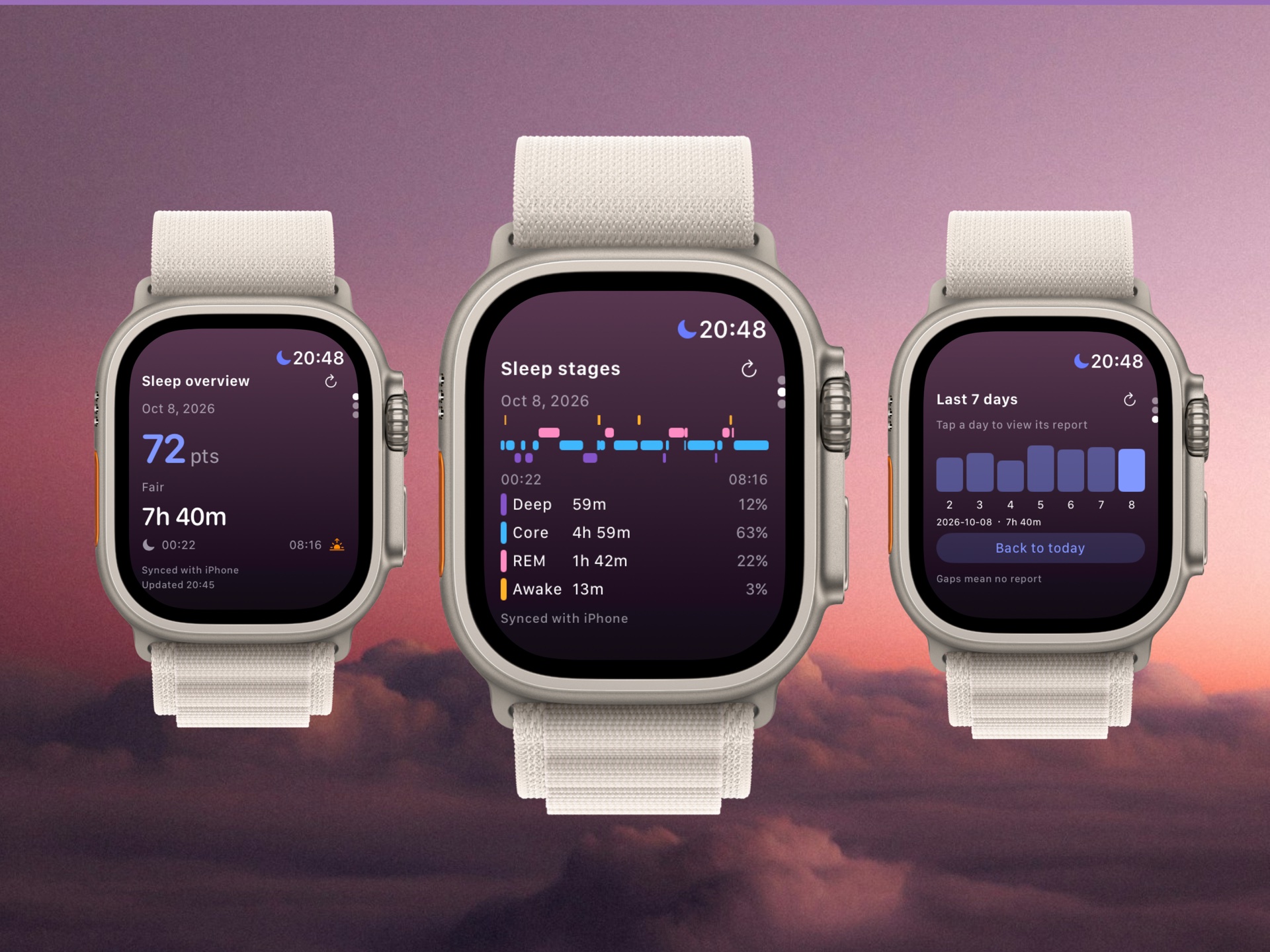
1. Start with the minutes. Deep is 59 minutes, Core is 4 hours 59 minutes and REM is 1 hour 42 minutes. Together they total 7 hours 40 minutes of estimated sleep. Awake adds another 13 minutes; it is not part of time asleep.
2. Check what the percentages divide by. Here the rounded percentages align with all four categories, including Awake, rather than sleep alone. For example, 299 Core minutes divided by 473 recorded minutes is about 63%; divided by 460 sleep minutes, it is about 65%. Check the app’s definition before comparing percentages across screens.
3. Read the timeline as a sequence. The colored segments show when the app places each estimated stage or awake period. Their order adds context that totals cannot provide. Frequent color changes alone do not establish fragmented sleep or a disorder.
4. Leave room for what the image cannot tell you. Neither 59 minutes of Deep nor 63% Core establishes a problem. The seven-day bars show duration, not seven nights of stage detail. To compare Deep or Core, open each night’s stage record and consider how you felt.
How accurate are Apple Watch sleep-stage estimates?
How to compare last night with your recent sleep
Use the previous seven days as a convenient starting point, and look further back when useful. The aim is to spot changes worth noticing, not to find a perfect stage ratio.
1. Check the data source
On iPhone, open Health and find Sleep. You can also view recent sleep data in the Sleep app on Apple Watch. SleepBestie requires an Apple Watch and reads its sleep records through Apple Health after you grant access. It presents and interprets those records rather than measuring your sleep with a separate sensor.
2. Start with total sleep time
An appealing set of percentages does not make up for too little sleep. Check how long you slept, then read the minutes and percentages for each stage. This helps you distinguish a shorter night from a change in how that night was divided.
3. Compare several nights
Was Deep noticeably different from recent nights? Did a change in REM coincide with a shorter night? Were you awake more often when the room was noisy or uncomfortable? These comparisons can suggest questions to explore, but they do not establish what caused the change.
4. Note changes in your routine
Note anything unusual: a later bedtime, alcohol, late caffeine, a demanding workout, travel, illness, or sleeping much later than usual. A few short notes can make trends easier to understand. They provide context, not a diagnosis.
5. Look at when changes happened
The timeline adds information that totals cannot show, such as an estimated awake period in the middle of the night. Use it to put your experience in context. Frequent changes between colored blocks are not, by themselves, evidence of a sleep disorder.
One unusual chart often needs more context. If changes continue, consider your routine and how you feel during the day. Seek professional advice for persistent sleep difficulties or concerning symptoms, even if your watch readings remain close to your usual values.
Start with one manageable change
Choose one adjustment that fits your routine and observe it for about a week:
- Keep a consistent wake time each day.
- Avoid alcohol close to bedtime.
- Reduce screen use and bright lighting as you wind down before bed.
Keep other habits reasonably steady so changes are easier to interpret. After a week, review total sleep time, nighttime wakefulness, and how rested you feel. A week can help you notice a pattern, but it cannot prove that the adjustment caused a change in Deep or REM.
If sleep difficulties persist or you continue to feel unwell, speak with a healthcare professional rather than relying on the chart alone.
FAQ
What is the difference between Deep, Core, and REM on Apple Watch?
Deep corresponds to N3, the deepest non-REM stage. Core combines the lighter N1 and N2 stages. REM is rapid eye movement sleep, when vivid dreams often occur. All three are normal parts of sleep; Apple Watch estimates how much time you spend in each.
What are sleep stages on Apple Watch?
They are the watch's estimates of time spent in Deep, Core, and REM, with Awake shown separately. The algorithm uses movement signals from the watch. These estimates help describe sleep patterns but do not replace a clinical sleep study.
What is deep sleep on Apple Watch?
Deep is the watch's estimate of N3, or slow-wave sleep, which usually occurs more in the earlier part of the night. Read it alongside total sleep time, recent trends, and how you feel. One low reading does not establish a health problem.
Low deep-sleep readings: what to consider
How much deep sleep is normal on Apple Watch?
There is no single Apple Watch deep-sleep percentage that everyone should aim for. Age, individual differences, and estimation error all matter. Your recent pattern can provide context, but it is not a medical normal range. If you have persistent sleep problems or daytime symptoms, do not dismiss them because the number matches your average.
Low deep-sleep readings: what to consider
What does my Apple Watch sleep pattern mean?
It shows an estimated timeline of sleep stages and wakefulness. Compare several nights, check total sleep time, and consider changes to your routine. The chart can reveal patterns to discuss, but it cannot identify the cause of a sleep problem on its own.
How SleepBestie can help
SleepBestie requires an Apple Watch. With your permission, it reads the watch's sleep data through Apple Health and helps you review stages, recent trends, and practical suggestions. It does not independently measure sleep, diagnose a condition, or replace professional care.
Understand last night in the context of your week
Review your Apple Watch sleep stages and recent trends with SleepBestie, alongside how you feel each day.
Download SleepBestie FreeRelated reading
- Apple Watch sleep tracker: how SleepBestie uses Watch data
- SleepBestie FAQ: Apple Health, privacy, and setup
- Why you may feel tired after eight hours of sleep
Sources
- Apple — Estimating Sleep Stages from Apple Watch
- Apple Support — Track your sleep with Apple Watch
- NHLBI — Stages of Sleep
This article is for general information, not medical advice, diagnosis, or treatment. Apple Watch sleep stages are estimates. Seek professional advice for persistent sleep problems, loud snoring, gasping during sleep, or concerning daytime sleepiness.